
Binary Tab: Minimalist Browser Experience
Overview
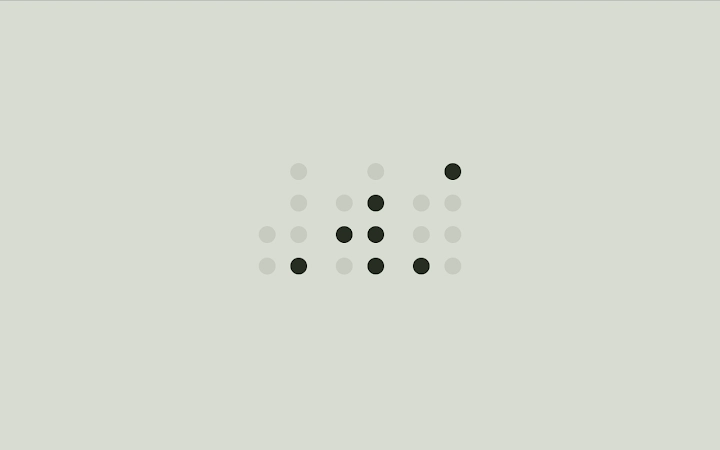
Binary Tab transforms the default new tab page into a sleek, minimalist binary clock interface. Designed for users who value simplicity and focus, it replaces the cluttered browser start page with a clean, elegant display that emphasizes time awareness. The software is ideal for professionals and digital creators seeking to reduce distractions while maintaining a productive workflow. By integrating a customizable clock with a dedicated bookmarks bar, Binary Tab serves both functional and aesthetic purposes. Its core purpose is to streamline the browsing experience, offering a distraction-free environment that enhances concentration and time management.
The developer did not provide additional background information. However, the software’s design philosophy reflects a strong emphasis on minimalism and user control. Real-world use cases include daily time tracking, focus sessions, and workspace personalization. Users can quickly access frequently visited sites via the bookmarks bar, which supports intuitive drag-and-drop organization. The integration of geolocation for dynamic sunset/sunrise inversion suggests an interest in ambient design, adapting the interface to natural light cycles. This makes it particularly suitable for remote workers, students, and anyone who values a calm, consistent digital environment.
Key Features & Capabilities
- Binary Clock Display – Replaces the default new tab with a minimalist binary clock. The clock uses binary digits to display the current time, offering a unique visual experience for users who appreciate both functionality and design.
- Customizable Color Scheme – Supports light, dark, and dynamic hex color modes. Users can choose a fixed theme or let the interface adapt based on ambient lighting conditions.
- Auto-Invert at Sunrise/Sunset – Uses geolocation to detect local sunrise and sunset times, automatically switching the color scheme to reduce eye strain during nighttime hours.
- Bookmarks Bar Integration – A fully functional bookmarks bar allows users to add, organize, and access favorite websites with ease. The bar can be shown, hidden, or set to auto-hide based on user preference.
- Settings Drawer – Accessible by hovering the cursor at the bottom of the page, this drawer provides an ever-expanding array of customization options, including clock size, digit display, and row number visibility.
- Minimalist Tab Replacement – Eliminates visual noise from the default new tab page, promoting focus and reducing digital clutter.
These features collectively support a distraction-free workflow. For example, a developer might use the binary clock to track coding sessions, while a student could benefit from the auto-invert feature during late-night study sessions. The ability to display row numbers aids in learning to read binary time, making it educational as well as practical. The bookmarks bar ensures quick access to essential tools, streamlining daily tasks.
User Interface, Workflow & Performance
The user interface of Binary Tab is clean and intuitive, built around a central binary clock with a subtle layout. Navigation is minimal, relying on hover interactions to reveal the settings drawer, which reduces on-screen clutter. The workflow is streamlined: users open a new tab and immediately see the clock, with optional access to bookmarks and settings. The design prioritizes simplicity, making it easy for users to adapt without a learning curve.
Performance observations are based on general software behavior patterns. The application is lightweight, with a file size of 15.4 MB, suggesting efficient resource usage. The developer did not specify resource usage details. Stability is expected to be high given the minimal nature of the software and the absence of complex background processes. No performance bottlenecks are anticipated for typical use cases on modern systems.
Compatibility & System Requirements
Binary Tab is compatible with Windows, Mac, and Linux operating systems. The software version is 1.8, with a download size of 15.4 MB. The developer did not specify exact system requirements. Compatibility information was partially provided. Users should ensure their system supports modern web standards, as the software functions as a browser extension or standalone tab replacement. No hardware-specific demands were mentioned.
Pros and Cons
Pros
- Minimalist, distraction-free design enhances focus
- Customizable color schemes, including dynamic sunset/sunrise adaptation
- Functional bookmarks bar with flexible visibility options
- Lightweight at just 15.4 MB
- Free to use with no hidden costs
- Open and transparent geolocation usage
Cons
- No official documentation or user guide provided
- Geolocation access required for auto-invert feature
- Limited to browser tab replacement functionality
- Customization options may be overwhelming for beginners
- No built-in backup or sync for bookmarks
FAQ Section
Is Binary Tab compatible with all major browsers?
Binary Tab is designed for use with modern web browsers on Windows, Mac, and Linux. Specific browser compatibility was not detailed in the provided information.
Is the software secure to use?
Binary Tab uses geolocation only when the user explicitly clicks the 'Use current location' button. The developer encourages users to inspect the code for transparency. No data is collected without user consent.
How often does the software update?
Version 1.8 was released on June 10, 2024. Updates are likely periodic, but release frequency was not specified.
What license type does Binary Tab use?
Binary Tab is free to use. The exact license type was not provided in the input.
Can I use Binary Tab offline?
Yes, Binary Tab functions without an internet connection once installed. The core clock and bookmark features operate independently of online access.
Final Thoughts + CTA
Binary Tab delivers a refreshing alternative to standard new tab pages, combining aesthetic elegance with practical functionality. Its minimalist design, customizable interface, and thoughtful features make it a standout tool for productivity-focused users. The integration of a binary clock, dynamic color adaptation, and a fully functional bookmarks bar creates a unique and immersive browsing experience. While it lacks advanced features like cloud sync or extensive documentation, its simplicity and transparency are significant strengths. For users seeking a clean, focused digital workspace, Binary Tab is an excellent choice.
Download Binary Tab now







